







CONAIS

Dynamic Forms for SharePoint

Create, customize, and automate SharePoint Online forms without writing a single line of code. Streamline your workflows with multi-level approvals, conditional logic, and intelligent notifications

×
Dynamic Forms

Dont Work Hard, Work Smart, Let Automation Take Over

How to Get Started

3-Step Process

Step 1

Connect Your Data Choose an existing SharePoint list or let Dynamic Forms create one for you. All SharePoint field types supported instantly

Step 2

Design Your Form Drag and drop fields, set up conditional logic, configure validation rules. Preview in real-time as you build. [Icon: Form builder]

Step 3

Launch & Automate Publish your form and set up approval workflows. Automated notifications handle the rest while you track everything in real-time.

Why Choose Conais Applications?

Maximize your Microsoft 365 investment with expert SharePoint modernization, intelligent workflows, and ecosystem optimization. 100+ successful implementations.

microsoft-partner-conais
  • Microsoft AppSource Verified All applications officially published and verified by Microsoft. Enterprise-grade security and reliability.
  • Built by Experts Who Implement We don’t just build apps – we implement solutions daily. Our apps solve real problems we’ve seen across 100+ projects.
  • Easy Integration, Zero Friction Designed specifically for Microsoft 365 and SharePoint. Seamless integration with your existing environment.
  • Continuous Updates & Support Regular feature updates, dedicated support team, and commitment to long-term maintenance.

Ready to Get Started?

[dflip id="4387"][/dflip]

Ready to Transform Your Microsoft 365 Experience?

Start with a free trial of our applications or discuss building a custom solution for your unique needs

Dynamic Forms for SharePoint

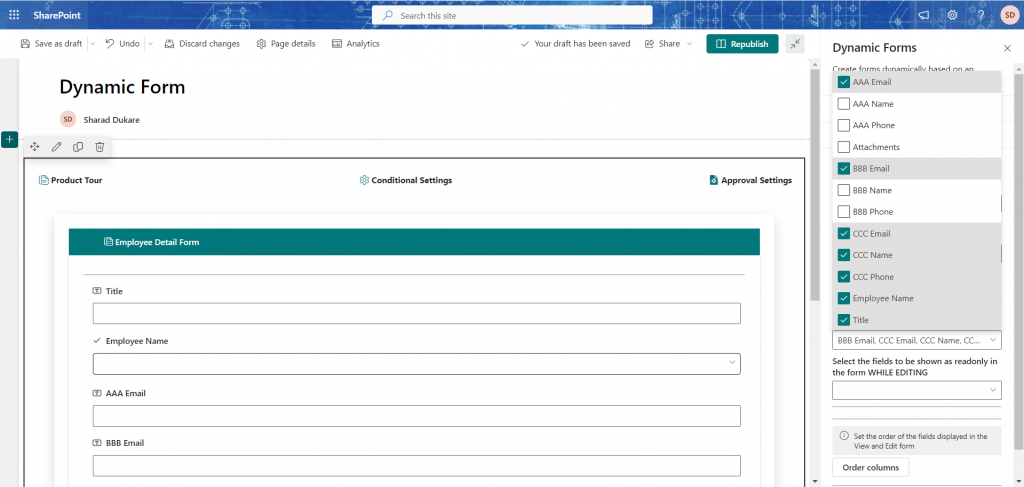
Dynamic Forms replaces that with a drag-and-drop builder that sits on top of the SharePoint lists you already have. Show or hide fields based on what someone answered two questions earlier. Route approvals to a specific group, a named user, or the requester’s own line manager. Lock fields in edit mode, collect comments against list items, and let everyone follow progress in a timeline view instead of chasing an inbox.

Every SharePoint field type is supported out of the box — managed metadata, lookups, person or group, calculated, external data. Notifications reach people where they already work, in Teams or Slack. And because everything runs inside your tenant, your form data never leaves your own Microsoft 365 environment.

Works with SharePoint Online and Microsoft 365, as well as SharePoint 2019 and 2016. Start with a 15-day trial — no credit card required.

How Dynamic Form Work?

Use Cases

01

Purchase Approvals

Multi-stage approval workflows with automatic routing based on budget thresholds. Finance teams process requests 60% faster.

Industry: Finance, Procurement

02

Time-Off Management

Employee vacation requests route automatically to managers with calendar integration. HR departments eliminate manual tracking.

Industry: HR, Operations

03

IT Service Tickets

Conditional forms route support requests to appropriate teams based on issue type. IT response times improve 45%.

Industry: IT, Help Desk

04

Document Approvals

Collaborative review workflows with commenting and version tracking. Legal and compliance teams maintain complete audit trails

Industry: Legal, Compliance

Frequently Asked Questions

The dynamic form is supported on SharePoint Online or Microsoft 365 and SharePoint 2019, 2016

It’s an enhanced alternative to SharePoint list form with extra productive features. It is majorly useful when you have a type of form whose content must change frequently to meet rapidly changing business and regulatory requirements.

  1. It gives you an option to work with your existing SharePoint list or you can create a new SharePoint list and the fields will be populated..
  2. It also allows you to show/hide columns in the form based on conditions and validation rules.
  3. It also allows you to choose the form fields and mark them disabled in Edit mode.
  4. It allows the user to provide comments to a SharePoint list data.
  5. It allows users to collect approvals from different teams
  6. It sends notifications for requests creation and approvals

It supports all the fields provided by SharePoint List

Single Line of TextMultiple Lines of Text
Single ChoiceNumber
CurrencyDate and Time
LookupYes/No
Person or GroupHyperlink or Picture
CalculatedImage
Task OutcomeExternal Data
Managed Metadata 

All the data for items/approvals is stored on your own Microsoft 365 tenant.

All the data for items/approvals is stored on your own Microsoft 365 tenant.

Yes, it can be altered to meet any custom business functionality. Please get in touch with us to help you meet your custom requirements.

Anyone who has access to the SharePoint list and the SharePoint page where the Dynamic forms were configured, can access the form. The form will not load or be accessible to any user who do not have permission on the site or the SharePoint list/site page.

The add-in will be available soon in MS Teams. Get in touch with us to know more about the same.

  • For your query about using a single license in test / production environment, please note the following points:
 
  1. If you have any questions please feel to contact us via this email channel or a direct call to our US helpline number @ +1 360 2444 330

  1.  


100+ projects delivered. Let's talk about yours.

Send us the process that’s costing your team the most time. Within one business day you’ll get an honest read from people who’ve built this before — including whether we think it’s worth doing at all.


Start Your AI Journey Today

Get a free AI readiness assessment and discover how AI can transform your operations

AI Robot Icon AI Chatbot
×