
Inventory Management for SharePoint
Transform your SharePoint into a powerful inventory control system. Track stock levels in real-time, manage vendors, automate reordering, and eliminate stockouts—all without leaving your Microsoft 365 environment.
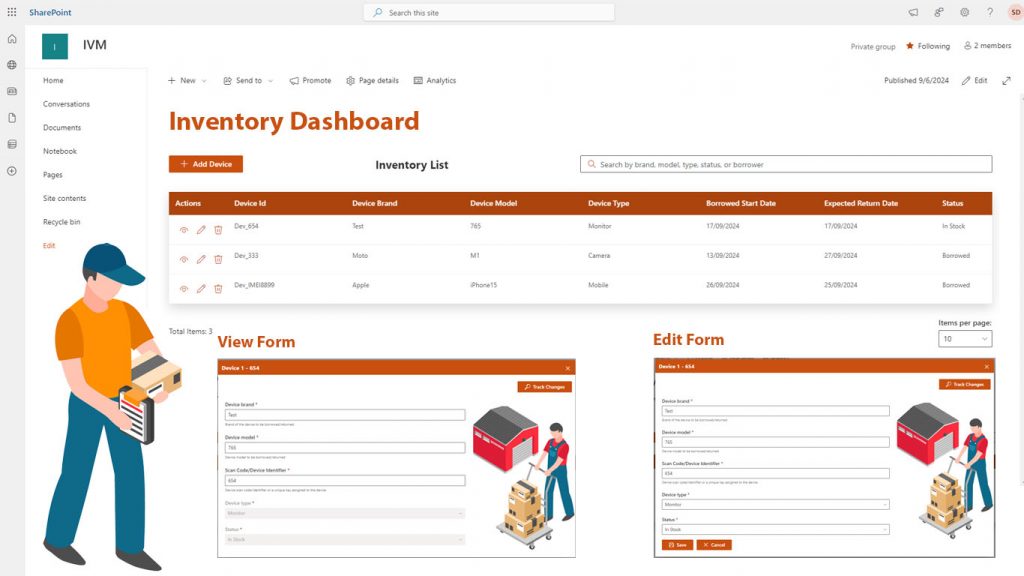
Smart Inventory Control. Real-Time Visibility. Zero Spreadsheet Chaos
How to Get Started
3-Step Process
Step 1
Install & Configure Deploy Inventory Management from Microsoft AppSource. Configure your product categories, locations, and units of measurement. Import existing inventory data from Excel.
Step 2
Set Up Your Workflow Define reorder points, assign user permissions, and connect barcode scanners. Customize dashboards to show metrics that matter to your team.
Step 3
Start Tracking Begin receiving stock, processing orders, and running cycle counts. Real-time dashboards keep everyone informed while automated alerts prevent issues.
READY TO GET STARTED?
Start with a free trial of our applications or discuss building a custom solution for your unique needs
Why Choose Conais Applications?
Maximize your Microsoft 365 investment with expert SharePoint modernization, intelligent workflows, and ecosystem optimization. 100+ successful implementations.

- Microsoft AppSource Verified All applications officially published and verified by Microsoft. Enterprise-grade security and reliability.
- Built by Experts Who Implement We don’t just build apps – we implement solutions daily. Our apps solve real problems we’ve seen across 100+ projects.
- Easy Integration, Zero Friction Designed specifically for Microsoft 365 and SharePoint. Seamless integration with your existing environment.
- Continuous Updates & Support Regular feature updates, dedicated support team, and commitment to long-term maintenance.
01
Warehouse Management
Track stock across multiple warehouses and locations. Real-time visibility into inventory movement eliminates manual counting and reduces shrinkage by 35%.
Industry: Distribution, Logistics, E-commerce
02
Manufacturing Operations
Manage raw materials, work-in-progress, and finished goods inventory. Automated alerts prevent production delays when components run low.
Industry: Manufacturing, Production
03
Retail Stock Control
Monitor store inventory levels and coordinate replenishment from central warehouses. Mobile scanning enables fast cycle counts during business hours.
Industry: Retail, Consumer Goods
04
IT Asset Management
Track computers, phones, software licenses, and equipment across departments. Automated checkout/checkin workflows maintain accountability.
Industry: IT, Corporate Services
Frequently Asked Questions
The system runs on SharePoint Online (Microsoft 365), SharePoint 2019, and SharePoint 2016. It leverages SharePoint lists for data storage, ensuring seamless integration with your existing environment.
Yes! You can import products, stock levels, and vendor information from Excel spreadsheets. Our import wizard guides you through mapping your columns to ensure accurate data transfer.
Absolutely. You can track inventory across unlimited locations—warehouses, stores, or storage areas. Transfer stock between locations with full audit trails.
The mobile app supports standard barcode and QR code formats. Use any smartphone or tablet camera, or connect Bluetooth barcode scanners for high-volume scanning.
While the system stores inventory valuation data, direct accounting integration requires Power Automate connectors or custom API development. We provide export capabilities for QuickBooks, Sage, and other systems.
The system supports FIFO (First-In-First-Out), LIFO (Last-In-First-Out), and Weighted Average costing methods. Choose the method that aligns with your accounting practices.
Our AI algorithm analyzes historical transaction data, identifies seasonal patterns, and calculates future demand. You can adjust forecasts manually and set custom parameters for specific products.
Yes! The mobile interface is designed for simplicity. Most warehouse teams become proficient within 1-2 hours. We provide video tutorials and quick-reference guides.
The mobile app includes offline mode. Scanned transactions queue locally and sync automatically when connectivity returns, ensuring no data loss.
Pricing depends on the number of users, locations, and transaction volume. Contact us for a customized quote based on your specific requirements.
100+ projects delivered. Let's talk about yours.
Send us the process that’s costing your team the most time. Within one business day you’ll get an honest read from people who’ve built this before — including whether we think it’s worth doing at all.
Start Your AI Journey Today
Get a free AI readiness assessment and discover how AI can transform your operations