
Inventory Management for SharePoint
Transform your SharePoint into a powerful inventory control system. Track stock levels in real-time, manage vendors, automate reordering, and eliminate stockouts—all without leaving your Microsoft 365 environment.
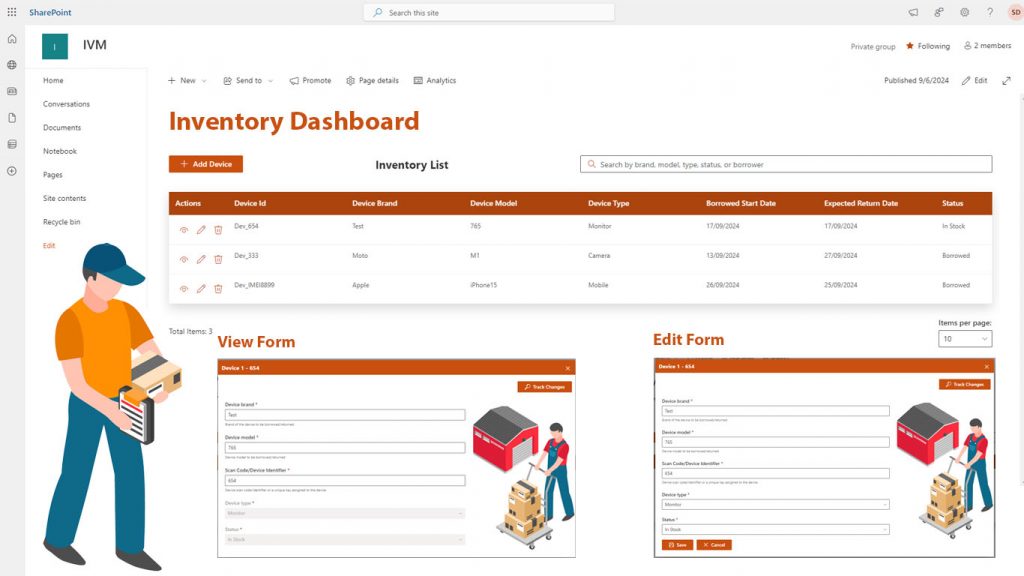
Smart Inventory Control. Real-Time Visibility. Zero Spreadsheet Chaos
Real-Time Stock Updates
Prevents delays in order fulfillment, enhances customer satisfaction, and improves decision-making with accurate inventory levels.
Product Categorization
Enhances organization, making it easier to locate and manage specific products, and improves reporting and analytics by providing insights into performance by category.
Mobile Access
Improves flexibility and responsiveness by allowing real-time updates, even in large or decentralized locations. It enhances the ability to track and manage inventory from anywhere.
Shipping & Receiving Management
Reduces errors in the receiving process, improves order accuracy, and enhances customer satisfaction by ensuring timely deliveries.
Barcode & QR Code Scanning
Increases accuracy and speeds up processes in both receiving and shipping, making it easier to track product movements across the supply chain
Inventory Forecasting
Helps reduce overstocking or stockouts, improves cash flow by aligning inventory with demand, and increases profitability by preventing dead stock.
Cycle Counting
Improves inventory accuracy without disrupting business operations, reduces discrepancies, and minimizes the need for costly and time-consuming full physical inventories.
Vendor Management
Simplifies reordering, improves supplier relationships, and ensures businesses are working with reliable vendors to maintain stock levels.
Customizable User Permissions
Increases security by limiting sensitive data to authorized personnel, while ensuring each user has access to the tools they need to perform their tasks effectively.
How to Get Started
3-Step Process
Step 1
Install & Configure Deploy Inventory Management from Microsoft AppSource. Configure your product categories, locations, and units of measurement. Import existing inventory data from Excel.
Step 2
Set Up Your Workflow Define reorder points, assign user permissions, and connect barcode scanners. Customize dashboards to show metrics that matter to your team.
Step 3
Start Tracking Begin receiving stock, processing orders, and running cycle counts. Real-time dashboards keep everyone informed while automated alerts prevent issues.

Compliance
Compliance Certifications
- SOC 2 Type II Certified
- GDPR Compliant
- ISO 27001 Certified
- Microsoft Partner
READY TO GET STARTED?
Start with a free trial of our applications or discuss building a custom solution for your unique needs
Security
Security Features
- Data Sovereignty: Your data stays in your Microsoft 365 tenant
- Encryption: 256-bit encryption at rest and in transit
- Authentication: Azure AD single sign-on
- Audit Trails: Complete logging of all actions
- Backup: Automatic daily backups included
- Access Control: Role-based permissions






01
Warehouse Management
Track stock across multiple warehouses and locations. Real-time visibility into inventory movement eliminates manual counting and reduces shrinkage by 35%.
Industry: Distribution, Logistics, E-commerce
02
Manufacturing Operations
Manage raw materials, work-in-progress, and finished goods inventory. Automated alerts prevent production delays when components run low.
Industry: Manufacturing, Production
03
Retail Stock Control
Monitor store inventory levels and coordinate replenishment from central warehouses. Mobile scanning enables fast cycle counts during business hours.
Industry: Retail, Consumer Goods
04
IT Asset Management
Track computers, phones, software licenses, and equipment across departments. Automated checkout/checkin workflows maintain accountability.
Industry: IT, Corporate Services
Trusted by Leading Organizations Worldwide
Streamlined Our Operations!
“What truly sets this inventory system apart is the support team. They made the onboarding process smooth and are always
Increased Accuracy, Reduced Errors
“Our inventory needs have grown exponentially over the past year, and this system has scaled with us perfectly. The customizable
A Game-Changer for Small Businesses
“With centralized inventory data, our sales, procurement, and warehouse teams are now on the same page. The system’s user-friendly interface
Real-Time Insights Are Priceless
“The ability to view real-time stock levels and generate reports with a click has been a lifesaver. We can now
Improved Collaboration Across Teams
“As a small business owner, I was struggling to keep track of stock manually. This system is intuitive, affordable, and






Frequently Asked Questions
The system runs on SharePoint Online (Microsoft 365), SharePoint 2019, and SharePoint 2016. It leverages SharePoint lists for data storage, ensuring seamless integration with your existing environment.
Yes! You can import products, stock levels, and vendor information from Excel spreadsheets. Our import wizard guides you through mapping your columns to ensure accurate data transfer.
Absolutely. You can track inventory across unlimited locations—warehouses, stores, or storage areas. Transfer stock between locations with full audit trails.
The mobile app supports standard barcode and QR code formats. Use any smartphone or tablet camera, or connect Bluetooth barcode scanners for high-volume scanning.
While the system stores inventory valuation data, direct accounting integration requires Power Automate connectors or custom API development. We provide export capabilities for QuickBooks, Sage, and other systems.
The system supports FIFO (First-In-First-Out), LIFO (Last-In-First-Out), and Weighted Average costing methods. Choose the method that aligns with your accounting practices.
Our AI algorithm analyzes historical transaction data, identifies seasonal patterns, and calculates future demand. You can adjust forecasts manually and set custom parameters for specific products.
Yes! The mobile interface is designed for simplicity. Most warehouse teams become proficient within 1-2 hours. We provide video tutorials and quick-reference guides.
The mobile app includes offline mode. Scanned transactions queue locally and sync automatically when connectivity returns, ensuring no data loss.
Pricing depends on the number of users, locations, and transaction volume. Contact us for a customized quote based on your specific requirements.
Learn How to Maximize Your Technology Investment
Join 100+ organizations using AI-powered automation to reduce costs, boost productivity, and drive digital transformation.
Start Your AI Journey Today
Get a free AI readiness assessment and discover how AI can transform your operations