
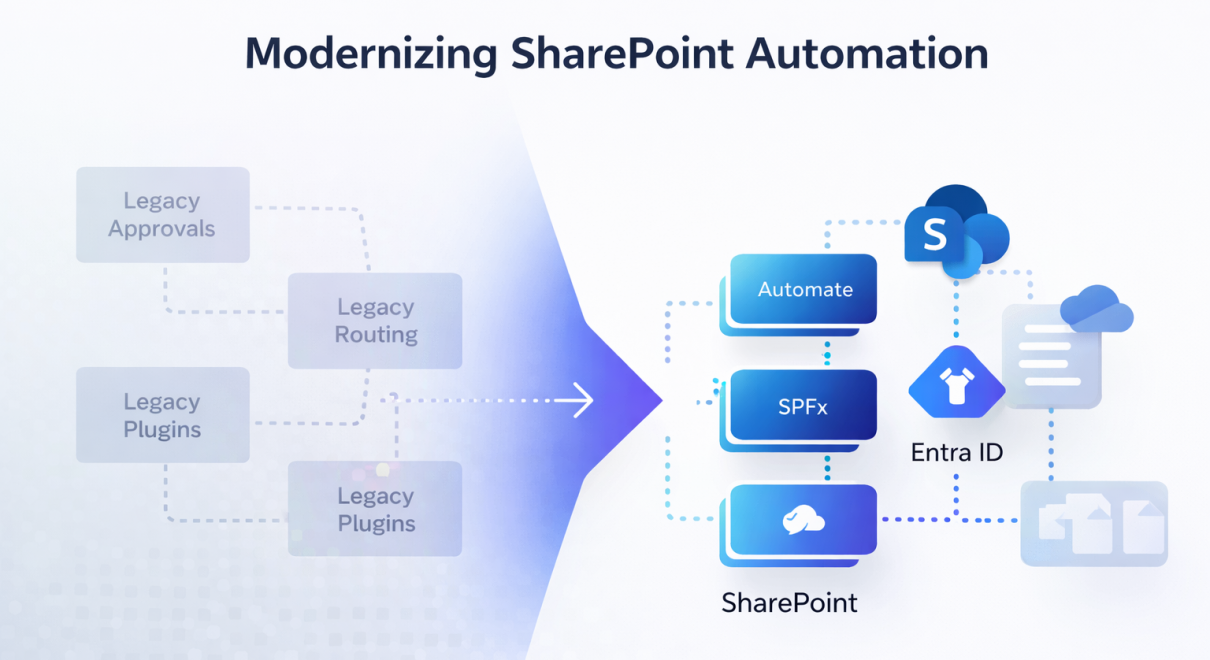
SharePoint 2013 Workflow Retirement is no longer a distant roadmap item. Microsoft officially confirmed the retirement timeline in its SharePoint Add-In retirement documentation. It is a structural modernization trigger for organizations still running legacy workflows, add-ins, and Azure ACS–based integrations inside Microsoft 365.
For years, SharePoint has quietly powered critical business processes behind the scenes. HR approvals, procurement routing, compliance workflows, finance escalations. Many of these systems were built on SharePoint 2013 workflows and the legacy Add-In model.
Now, both are reaching end of life.
This is not just a technical deprecation. It is a structural shift in how Microsoft expects organizations to build, secure, and extend SharePoint going forward.
Organizations that treat this as a simple migration task will miss the opportunity. Organizations that treat it as a modernization milestone will come out stronger.
What Is Being Retired and Why It Matters
Two major components are being phased out:
- SharePoint 2013 Workflows
- SharePoint Add-In model (including Azure ACS dependency)
Microsoft’s direction is clear. The legacy workflow engine and Add-In extensibility model were not designed for today’s cloud-native, identity-first, API-driven architecture.
Key implications include:
- SharePoint 2013 workflows will stop functioning in SharePoint Online.
- SharePoint Add-Ins will no longer be installable or operational in Microsoft 365 tenants.
- Azure ACS-based authentication used by provider-hosted Add-Ins is also being retired.
- Remote event receivers tied to ACS will stop firing.
The recommended replacement stack:
- Power Automate for workflow automation (limited scenarios)
- SharePoint Framework (SPFx) for extensibility
- Microsoft Entra ID for modern authentication
- Webhooks or Graph-based event models instead of remote event receivers
This is not a patch. It is an architectural reset.
The Hidden Risk: Silent Business Dependency
The biggest risk is not technical failure.
It is invisible dependency.
In many enterprises, SharePoint 2013 workflows were built years ago using SharePoint Designer. Documentation is incomplete. Ownership has changed. Some workflows run quietly in the background without active maintenance.
When they stop functioning, the impact will surface in:
- Broken approval chains
- Compliance reporting gaps
- HR onboarding delays
- Finance routing failures
- Governance blind spots
Add-Ins introduce additional complexity. Many provider-hosted Add-Ins rely on Azure ACS principals and custom permissions that are poorly tracked. Once disabled, integrations may fail without obvious error messages.
Modernization is not optional. The only question is whether it will be controlled or reactive.
Why This Is More Than a Migration Project
Treating this as a one-to-one rebuild misses the point.
Simply rewriting a SharePoint 2013 workflow into Power Automate without rethinking architecture often results in:
- Fragmented automation logic
- Increased licensing costs
- Performance bottlenecks
- Governance drift
- New technical debt
The retirement forces a more strategic question:
Are your business processes aligned with modern Microsoft 365 architecture?
This is where modernization becomes an opportunity rather than a burden.
The Modernization Path: From Legacy Workflows to Future-Ready Architecture
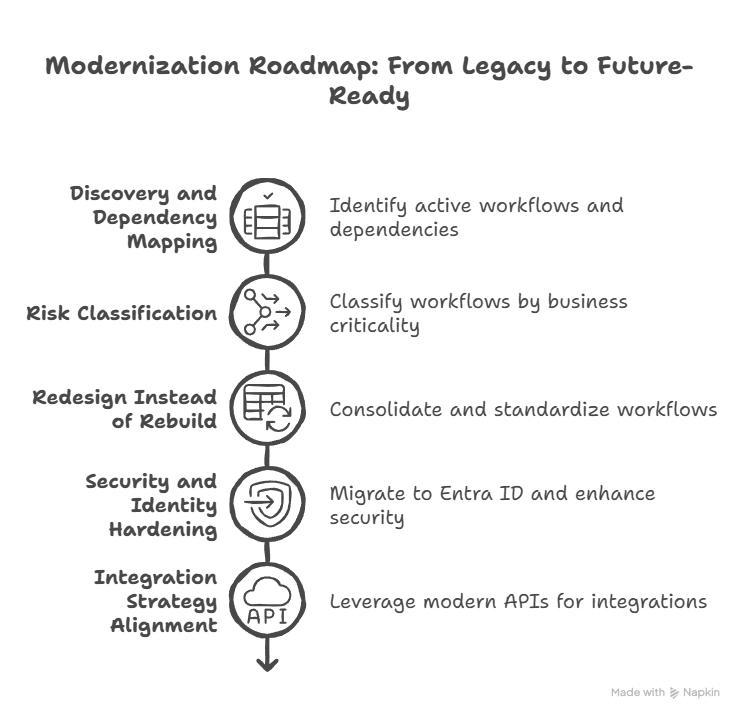
A structured modernization roadmap typically includes five stages:
1. Discovery and Dependency Mapping
- Identify all active SharePoint 2013 workflows
- Audit SharePoint Add-Ins (tenant + site level)
- Scan Azure ACS principals
- Detect remote event receivers
- Map business criticality
Microsoft’s assessment tools help, but interpretation requires architectural judgment.
2. Risk Classification
Not all workflows deserve rebuilding.
Classify them as:
- Business-critical
- Operational but low impact
- Obsolete
- Redundant
Many organizations discover that 20–30% of legacy workflows can be retired rather than migrated.
3. Redesign Instead of Rebuild
Instead of copying logic verbatim:
- Consolidate duplicated workflows
- Standardize approval patterns
- Centralize integration logic
- Remove SharePoint Designer dependencies
- Replace synchronous blocking events with modern asynchronous models
This is where SPFx, Power Platform, and external integration layers should be evaluated holistically.
4. Security and Identity Hardening
The Azure ACS retirement is not cosmetic. It forces:
- Migration to Entra ID-based authentication
- Permission re-evaluation
- Removal of over-scoped principals
- Governance standardization
Many tenants currently operate with excessive app permissions inherited from Add-In era practices.
Modernization is the right moment to fix that.
5. Integration Strategy Alignment
Legacy Add-Ins often hard-coded business integrations.
Modern SharePoint architecture should:
- Leverage SPFx for UI extensibility
- Use Microsoft Graph for API consistency
- Implement webhook-based or event-driven models
- Isolate external SaaS integrations behind managed APIs
This reduces future migration cost dramatically.
Where AI and Automation Strategy Intersect
Modernization is not only about keeping workflows running.
It is about preparing your collaboration layer for intelligent automation.
Legacy workflows were deterministic and rigid. Modern enterprise systems increasingly rely on:
- Event-driven automation
- Cross-system orchestration
- AI-assisted process routing
- Data-driven decision triggers
If your SharePoint layer remains anchored to deprecated models, AI initiatives will struggle to integrate cleanly.
This is why modernization often overlaps with broader transformation programs.
As we outlined in our AI Readiness strategy framework, sustainable AI deployment depends on modern, well-governed digital infrastructure. Legacy workflow engines and outdated extensibility models create friction at exactly the layer AI needs to integrate.
Modern SharePoint architecture is not only about compliance.
It is about readiness.
Common Migration Mistakes to Avoid
Across enterprise projects, we repeatedly see similar errors:
Mistake 1: Rebuilding everything immediately
Leads to rushed deployments and regression issues.
Mistake 2: Overusing Power Automate for complex orchestration
Works well for lightweight flows, struggles at scale.
Mistake 3: Ignoring identity model changes
Azure ACS retirement forces security redesign.
Mistake 4: Treating SPFx as a cosmetic UI replacement
SPFx is an extensibility framework, not just a web part tool.
Mistake 5: Delaying assessment until workflows start failing
By then, you are operating under time pressure.
A phased modernization approach reduces both risk and cost.
Why Modernization Favors Proactive Organizations
Organizations that move early gain:
- Clean governance structure
- Reduced technical debt
- Better cross-system integration
- Future-proof extensibility
- AI-ready collaboration infrastructure
Organizations that delay often face:
- Emergency remediation
- Higher consulting cost
- Business disruption
- Fragmented quick fixes
The difference is not technical capability.
It is timing.
The Strategic Decision Ahead
The retirement of SharePoint 2013 workflows and Add-Ins marks the end of a legacy extensibility era.
But it also signals something bigger.
Microsoft 365 is consolidating around:
- SPFx
- Graph-first development
- Entra ID security
- Event-driven models
- Cloud-native architecture
Modernization is no longer about feature upgrades.
It is about architectural alignment.
The question for leadership teams is not whether migration will happen.
It is whether it will be handled as a tactical fix or as a strategic modernization initiative.
How ConAIs Supports SharePoint Modernization
We help organizations:
- Audit SharePoint 2013 workflow dependencies
- Assess Add-In and Azure ACS exposure
- Design SPFx migration strategy
- Redesign automation architecture
- Implement governance-first modernization roadmaps
- Align SharePoint infrastructure with broader AI and automation strategy
If your organization still relies on legacy SharePoint workflows or Add-Ins, now is the right moment to evaluate exposure and define a modernization plan.
Proactive migration is controlled transformation.
Reactive migration is operational recovery.
